

If you are an AutoCAD or Civil 3D professional, you already know the pain of manually calculating the total lengths of lines, polylines, and pipe networks. Tallying up these measurements, grouping them by layer, and transferring the data into a formatted Excel spreadsheet or AutoCAD table can eat up hours of your workday.
Enter INAR Total Length Studio—a premium, fully automated AutoLISP utility designed to revolutionize how you calculate, categorize, and report geometric lengths in your drawings.
What is INAR Total Length Studio?
INAR Total Length Studio is an advanced AutoLISP script engineered specifically for AutoCAD and Civil 3D environments. It goes far beyond basic length calculators. This tool intelligently scans your drawing, calculates the exact lengths of LINE, LWPOLYLINE, and POLYLINE objects, categorizes the totals by Layer, and instantly generates professional, presentation-ready outputs.
Whether you are estimating pipe networks, calculating road centerlines, or tallying electrical conduits, this AutoCAD automation tool delivers pinpoint accuracy and stunning visual reports in seconds.
🌟 Key Features of INAR Total Length Studio
1. Smart Layer Categorization
Stop copying and pasting layer names into spreadsheets. The script automatically extracts the layer information from your selected objects and groups the total lengths accordingly. The results are neatly sorted alphabetically for easy reading.
2. Professional AutoCAD Table Generation
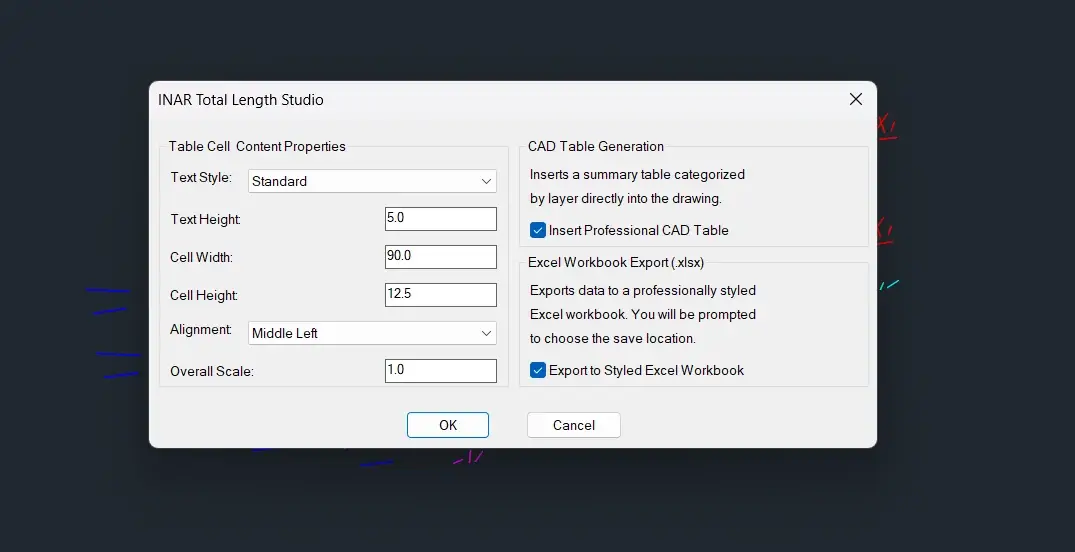
Need a summary table directly inside your drawing? INAR Total Length Studio features a highly customizable CAD Table Generator. You can control:
- Text Style and Text Height
- Cell Width and Cell Height
- Text Alignment (9 different alignment options)
- Overall Table Scale
3. Premium Excel Export with Data Visualization (.xlsx)
This is where the tool truly shines. Instead of exporting a plain CSV file, INAR Total Length Studio uses native COM automation to build a highly styled, professional Excel workbook.
- Custom Typography & Layout: Features modern fonts (Segoe UI), color-coded headers, and hidden gridlines for a clean dashboard look.
- Automated Formulas: Includes a dynamic
SUMformula for the Grand Total. - Auto-Generated Doughnut Chart: Automatically generates a modern, beautifully styled Doughnut Chart showing the percentage distribution of lengths by layer.
4. Interactive DCL Dashboard
No need to memorize complex command-line prompts. The tool launches a sleek, interactive Dialog Control Language (DCL) dashboard, allowing you to configure your table properties and toggle your desired outputs (CAD Table, Excel Export, or both) with a simple click.
🚀 How to Install and Use the AutoLISP Script
Getting started with INAR Total Length Studio is quick and seamless.
Step 1: Download the File
(See the dedicated download section below to get your file!)
Step 2: Load the Script in AutoCAD / Civil 3D
- Open AutoCAD or Civil 3D.
- Type
APPLOADin the command line and press Enter. - Browse to the location of your downloaded
.lspfile. - Select the file and click Load.
- (Optional) Add it to your “Startup Suite” so it loads automatically every time you open a new drawing.
Step 3: Run the Command
- Type
INAR-TLENin the command line and press Enter. - The INAR Total Length Studio Dashboard will appear.
- Configure your Text Styles, dimensions, and alignment.
- Check the boxes for Insert Professional CAD Table and/or Export to Styled Excel Workbook.
- Click OK.
- Select the lines and polylines in your drawing area and press Enter.
- Specify the insertion point for the CAD table (if selected) and choose the save location for your Excel report (if selected).
📥 Download INAR Total Length Studio
Ready to supercharge your CAD workflow? Download the script below and start automating your length calculations today.
⚠️ IMPORTANT FILE FORMAT NOTICE:
This tool is provided strictly in the native.lsp(AutoLISP) file format.
- Do not alter the file extension. It must end in
.lsp.- If your web browser automatically downloads the file as a
.txt(Text Document), simply right-click the downloaded file, select Rename, and change the extension from.txtto.lspbefore loading it into AutoCAD.



💡 Why Civil 3D and AutoCAD Users Need This Tool
- Massive Time Savings: What used to take 30–60 minutes of manual measuring and Excel formatting now takes less than 10 seconds.
- Eliminate Human Error: Automated calculations ensure your material takeoffs and quantity estimates are 100% accurate.
- Client-Ready Deliverables: The auto-generated Excel reports and CAD tables look incredibly professional, adding immediate value to your project deliverables.
- Seamless Civil 3D Integration: Works flawlessly alongside Civil 3D workflows for calculating alignments, pipe networks, and feature lines converted to polylines.
Conclusion
Stop wasting billable hours on manual length calculations and messy spreadsheet formatting. INAR Total Length Studio is the ultimate AutoCAD productivity tool for engineers, drafters, and CAD managers who demand accuracy, speed, and professional presentation.
Require support or custom AutoLISP development for your specific CAD workflows? Contact our automation experts today!
 Inar Learn